-1.png?width=684&height=108&name=Titan%20Logix%20Current%20Service%20Standard%20(1)-1.png "Titan Logix")
.svg "Titan-Logix-Logo-horizontal-black (1)")
Get Ready for FINCH III
At Titan Logix, we’re committed to delivering smarter, more reliable tank monitoring solutions. The FINCH III is our most advanced display yet — built to improve accuracy, simplify setup, and support your operations long-term.
.png?width=383&height=303&name=FINCH%20III%20(3).png)
Why Upgrade to FINCH III?
- Seamless Integration: Compatible with 3rd party hardware (LCR.iQ is an example) and designed for maximum safety and compliance
- Improved Measurement Accuracy: Reduced top and bottom deadbands for greater usable tank volume
- Less Downtime: Bluetooth configuration for faster installs and adjustments
IMPORTANT NOTICE:
FINCH III is officially replacing our FINCH II-W and 6W displays. We will continue to sell FINCH II-W/6W displays while inventory lasts. However, supply is limited and we anticipate inventory will be depleted by June – July 2026 timeframe.
After that point, FINCH III will be the ONLY display available for new installs and replacements.
NEXT STEPS:
We strongly encourage you to begin planning your upgrade to FINCH III as early as possible. This page provides all the information you need to get started.
Our Customer Success Team is ready to help you schedule installations, coordinate training, and ensure a smooth rollout for your team.
-
Email: service@titanlogix.com
-
Phone: 1-877-462-4085 ext 2
We look forward to helping you modernize your system and get the most out of your Titan investment!
Ordering FINCH III Hardware
Important Compatibility Notes:
- Installations with two or more compartments, FINCH III requires Titan's Smart Junction Box and quick connect cable (Part #: TITAN J-BOX, JB-Wire15)
- FINCH III is ONLY compatible with TD100 transmitters - TD80 transmitters are NOT supported with FINCH III
- All FINCH III systems are configured exclusively through Titan Portal and Titan Install app
Use the part numbers in the table below when ordering your FINCH III system. You will also need to order one TD100 transmitter and probe for each compartment.
-png.png?width=199&height=158&name=FINCH%20III%20(3)-png.png) |
Name: FINCH III Display Part #: FINCH III Part Description: FINCH III Display, connects to up to 6 transmitters |
-png-1.png?width=142&height=152&name=E0020%20(1)-png-1.png) |
Name: High Temp Wiring Kit Part #: HT-Wire50 OR Part #: HT-Wire75 Part Description: High Temp Wire Kit with explosion-proof elbow for FINCH III. Required for each compartment. Available in 50 ft or 75 ft lengths. Connects from the transmitter, down the tank, to either the FINCH III display or the Titan Junction Box. TIP: For systems with more than 3 compartments, we recommend using the HT-Wire75 for the fourth and each additional compartment. The 75 foot length ensures you have enough cable to reach the FINCH III display. |
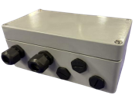 |
Name: Titan Junction Box Part #: TITAN J-BOX Part Description: Titan Junction box for a 2+ compartment system |
-png.png?width=143&height=129&name=E0020%20(2)-png.png) |
Name: Quick Connect Cable Part #: JB-Wire15 Part Description: 15 ft Wire Kit with quick-connect for Titan Junction Box and FINCH III. Required when using a Titan Junction Box. |
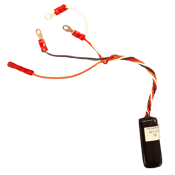 |
Name: Optic Booster for Rack Loading using FINCH III Part #: 3002-0154 Part Description: Optic booster that must be hard-wired to the FINCH III optic connection on the circuit board. |

LEGACY HARDWARE
Titan Logix no longer sells or supports the following hardware:
.png?width=131&height=125&name=Titan%20Logix%20Current%20Service%20Standard%20(3).png)
.png?width=132&height=126&name=Titan%20Logix%20Current%20Service%20Standard%20(2).png)
.png?width=93&height=109&name=Titan%20Logix%20Current%20Service%20Standard%20(6).png)
Our FINCH II-W/6W Displays will only be sold until quantity lasts, which is projected to be June/July 2026.
.png?width=279&height=163&name=Titan%20Logix%20Current%20Service%20Standard%20(4).png)